RPO vs. RTO: Key differences explained with examples, tips
The recovery point objective and recovery time objective enable an organization to know how much data it can lose and how long it can be down, key elements of a backup and DR plan.

Two important metrics -- recovery time objective and recovery point objective -- are essential when developing data backup and recovery plans, as well as data storage, business continuity, technology disaster recovery and operational resilience plans.
Examine both metrics, how to compute them and their cost and risk implications, and how to build them into a variety of resilience plans.
What is RTO?
A recovery time objective (RTO) specifies the amount of time from the occurrence of a disruptive event to when the affected resource must be fully operational and ready to support the organization's objectives. Figure 1 depicts the RTO metric.
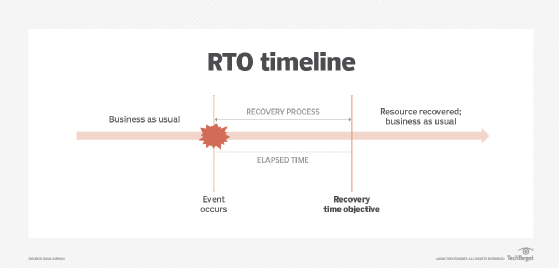
An inverse relationship exists between the time for recovery and the cost needed to support recovery. Specifically, the shorter an RTO is in terms of time, the more the cost for recovery increases, and vice versa. As such, it is necessary to involve business unit leaders when determining RTO values.
What is RPO?
Recovery point objective (RPO) is especially important when it comes to data backup and recovery activities. A tight metric means data must not age much from when it was last backed up. As a result, the data will be as up-to-the-moment as possible. Figure 2 depicts the RPO and its relationship to the RTO.
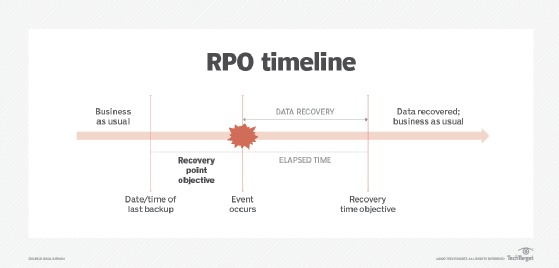
Due to the inverse relationship between the RPO value and the cost to achieve it, a short RPO of 10 to 30 seconds, for example, means that organizations must back up data frequently. Organizations may need high-speed backup technologies such as data mirroring or continuous replication to achieve that RPO. Greater network bandwidth may be needed to transmit large quantities of data.
RPO vs. RTO: Similarities and differences
RTOs and RPOs are key backup and recovery metrics that ensure critical data and systems are available when needed. Table 1 provides examples of how missed RTOs and RPOs could impact an organization in a post-disaster scenario.
| Situation | Planned RPO | Actual RPO | Planned RTO | Actual RTO | Analysis |
| Mission-critical application | 0.5 hr | 1.5 hrs | 0.5 hr | 2.0 hrs | Application backup resources were insufficient; technology couldn't be recovered quickly enough. |
| Critical database | 0.25 hr | 2.0 hrs | 0.25 hr | 2.0 hrs | Application backup resources were insufficient; technology couldn't be recovered quickly enough. |
| Critical network switch | NA | NA | 0.5 hr | 2.0 hrs | Technology couldn't be recovered quickly enough. |
| HVAC system and associated application | 0.25 hr | 2.0 hrs | 0.25 hr | 2.5 hrs | HVAC system backup resources were insufficient; HVAC system couldn't be recovered quickly enough. |
While RPO and RTO values were aggressive for each asset, the outcomes showed that the assets weren't as well protected as anticipated. The amount of time needed for recovery indicates the need for the following:
- Reconfiguration of storage resources and backup platforms for application priorities.
- Reconfiguration and/or redesign of network infrastructure resources to reduce latency and improve the speed of recovery.
- Spare parts that can be used as part of the recovery process.
- Greater focus on critical infrastructure, environmental systems and efforts to maintain business operations.
RPO and RTO strategies
In comparing RPO vs. RTO, the timetable is different. RPOs are assigned before an event occurs. RTOs are designated after an event occurs. In practice, a short RTO usually necessitates an equally short RPO, particularly when data protection is required.
If the disaster recovery strategy addresses only the backup and recovery of systems, an RTO value might be sufficient to determine how recovery will take place. But if the system to be recovered also processes critical data (see Table 1), then both metrics should be synchronized.
RTO and RPO in cloud applications and storage
As IT operations migrate to cloud environments, RTO and RPO values are just as important, if not more so, because cloud vendors have greater control over resources needed to achieve the desired RTO and RPO values. In situations such as cloud-based data storage and retrieval, users must communicate their desired RTO and RPO values to the vendor and then see how the vendor responds.
Service-level agreements need to include RTO and RPO values if they are critical metrics. Since cloud vendors can scale resources to fit client needs, RTOs and RPOs may not be difficult to achieve. The challenge then is to minimize the added cost to achieve new or revised RTO and RPO values.
Computing RPO and RTO
A business impact analysis (BIA) identifies relevant RTO and RPO values. Risk analyses can also provide valuable input. BIAs typically identify mission-critical business processes and the technologies, people and facilities needed to ensure normal operations. In addition to identifying the financial implications of a disruption, RTO and RPO values are among their many outcomes.
During a BIA, business unit leaders and senior management must assign numeric values to what they feel are best-case scenarios for recovering from business disruptions.
RTO and RPO values are strictly numeric time values. For example, an RTO for a critical server might be one hour, whereas the RPO for less-than-critical data transaction files might be 24 hours.
As RTO and RPO numeric values decrease, costs to achieve those metrics are likely to increase. The only way to determine the true cost is to first identify the desired RTO and RPO values, then conduct research to determine what is needed to achieve the metric if a disruption occurs.
Potential resistance from management may occur if it doesn't want to invest additional funds to achieve the given metrics. Management must understand that additional risk and loss may result if a disruptive event occurs.
Tips for achieving RPOs and RTOs
Based on the results of a risk analysis and BIA, IT leadership should have a good idea of the events that could threaten IT operations.
Risk analyses provide event data indicating the frequency of occurrence, likelihood of occurrence and effects to the organization. Analyses might also identify vulnerabilities and potential threats.
Once RTO and RPO values have been identified and quantified, IT administrators can locate infrastructure assets and identify measures that can help reduce threats or mitigate their severity should they occur.
Building RTO and RPO into data backup and recovery plans
The inclusion of RTO and RPO metrics in data backup, data recovery and other resilience-based plans is essential and ensures the procedures, personnel and technology resources used to achieve the metrics are appropriate. The metrics indicate where the recovery bar has been set.
For data backup and recovery, RTO and RPO values are essential for planning, as they help determine the optimum data backup and technology configuration to achieve the goals. They are also important from compliance and audit perspectives, for example, as auditors might look for evidence of these values as key data backup and recovery controls.
Paul Kirvan is an independent consultant, IT auditor, technical writer, editor and educator. He has more than 25 years of experience in business continuity, disaster recovery, security, enterprise risk management, telecom and IT auditing.