
disaster recovery plan (DRP)
What is a disaster recovery plan (DRP)?
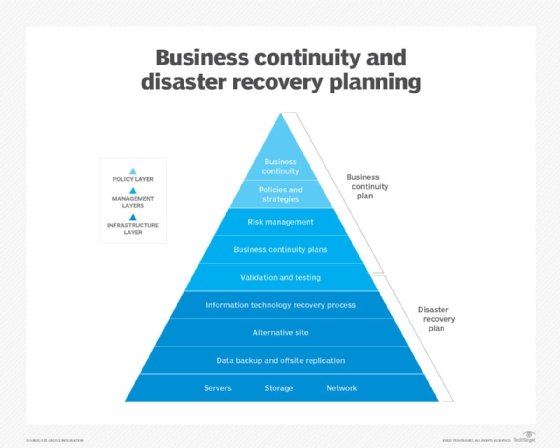
A disaster recovery plan (DRP) is a documented, structured approach that describes how an organization can quickly resume work after an unplanned incident. A DRP is an essential part of a business continuity plan (BCP). It is applied to the aspects of an organization that depend on a functioning information technology (IT) infrastructure. A DRP aims to help an organization resolve data loss and recover system functionality so that it can perform in the aftermath of an incident, even if it operates at a minimal level.
The plan consists of steps to minimize the effects of a disaster so the organization can continue to operate or quickly resume mission-critical functions. Typically, a DRP involves an analysis of business processes and continuity needs. Before generating a detailed plan, an organization often performs a business impact analysis (BIA) and risk analysis (RA), and it establishes recovery objectives.
As cybercrime and security breaches become more sophisticated, it is important for an organization to define its data recovery and protection strategies. The ability to quickly handle incidents can reduce downtime and minimize financial and reputational damages. DRPs also help organizations meet compliance requirements, while providing a clear roadmap to recovery.
Some types of disasters that organizations can plan for include the following:
- application failure
- communication failure
- power outage
- natural disaster
- malware or other cyber attack
- data center disaster
- building disaster
- campus disaster
- citywide disaster
- regional disaster
- national disaster
- multinational disaster
Recovery plan considerations
When disaster strikes, the recovery strategy should start at the business level to determine which applications are most important to running the organization. The recovery time objective (RTO) describes the amount of time critical applications can be down, typically measured in hours, minutes or seconds. The recovery point objective (RPO) describes the age of files that must be recovered from data backup storage for normal operations to resume.
Recovery strategies define an organization's plans for responding to an incident, while disaster recovery plans describe how the organization should respond. Recovery plans are derived from recovery strategies.
In determining a recovery strategy, organizations should consider such issues as the following:
- budget
- insurance coverage
- resources -- people and physical facilities
- management team's position on risks
- technology
- data and data storage
- suppliers
- compliance requirements
Management approval of recovery strategies is important. All strategies should align with the organization's goals. Once DR strategies have been developed and approved, they can be translated into disaster recovery plans.
Types of disaster recovery plans
DRPs can be tailored for a given environment. Some specific types of plans include the following:
- Virtualized disaster recovery plan. Virtualization provides opportunities to implement DR in a more efficient and simpler way. A virtualized environment can spin up new virtual machine instances within minutes and provide application recovery through high availability. Testing is also easier, but the plan must validate that applications can be run in DR mode and returned to normal operations within the RPO and RTO.
- Network disaster recovery plan. Developing a plan for recovering a network gets more complicated as the complexity of the network increases. It is important to provide a detailed, step-by-step recovery procedure; test it properly; and keep it updated. The plan should include information specific to the network, such as in its performance and networking staff.
- Cloud disaster recovery plan. Cloud DR can range from file backup procedures in the cloud to a complete replication. Cloud DR can be space-, time- and cost-efficient, but maintaining the disaster recovery plan requires proper management. The manager must know the location of physical and virtual servers. The plan must address security, which is a common issue in the cloud that can be alleviated through testing.
- Data center disaster recovery plan. This type of plan focuses exclusively on the data center facility and infrastructure. An operational risk assessment is a key part of a data center DRP. It analyzes key components, such as building location, power systems and protection, security and office space. The plan must address a broad range of possible scenarios.
Scope and objectives of DR planning
The main objective of a DRP is to minimize negative effects of an incident on business operations. A disaster recovery plan can range in scope from basic to comprehensive. Some DRPs can be as much as 100 pages long.
DR budgets vary greatly and fluctuate over time. Organizations can take advantage of free resources, such as online DRP templates, like the SearchDisasterRecovery template below.
Several organizations, such as the Business Continuity Institute and Disaster Recovery Institute International, also provide free information and online content how-to articles.
An IT disaster recovery plan checklist typically includes the following:
- critical systems and networks it covers;
- staff members responsible for those systems and networks;
- RTO and RPO information;
- steps to restart, reconfigure, and recover systems and networks; and
- other emergency steps required in the event of an unforeseen incident.
The location of a disaster recovery site should be carefully considered in a DRP. Distance is an important, but often overlooked, element of the DRP process. An off-site location that is close to the primary data center may seem ideal -- in terms of cost, convenience, bandwidth and testing. However, outages differ greatly in scope. A severe regional event can destroy the primary data center and its DR site if the two are located too close together.
How to build a disaster recovery plan
The disaster recovery plan process involves more than simply writing the document. Before writing the DRP, a risk analysis and business impact analysis can help determine where to focus resources in the disaster recovery process.
The BIA identifies the impacts of disruptive events and is the starting point for identifying risk within the context of DR. It also generates the RTO and RPO. The RA identifies threats and vulnerabilities that could disrupt the operation of systems and processes highlighted in the BIA.
The RA assesses the likelihood of a disruptive event and outlines its potential severity.
A DRP checklist should include the following steps:
- establishing the range or extent of necessary treatment and activity -- the scope of recovery;
- gathering relevant network infrastructure documents;
- identifying the most serious threats and vulnerabilities, as well as the most critical assets;
- reviewing the history of unplanned incidents and outages, as well as how they were handled;
- identifying the current disaster recovery procedures and DR strategies;
- identifying the incident response team;
- having management review and approve the DRP;
- testing the plan;
- updating the plan; and
- implementing a DRP or BCP audit.
Disaster recovery plans are living documents. Involving employees -- from management to entry-level -- increases the value of the plan.
Another component of the DRP is the communication plan. This strategy should detail how both internal and external crisis communication will be handled. Internal communication includes alerts that can be sent using email, overhead building paging systems, voice messages and text messages to mobile devices. Examples of internal communication include instructions to evacuate the building and meet at designated places, updates on the progress of the situation and notices when it's safe to return to the building.
External communications are even more essential to the BCP and include instructions on how to notify family members in the case of injury or death; how to inform and update key clients and stakeholders on the status of the disaster; and how to discuss disasters with the media.
Disaster recovery plan template
An organization can begin its DRP with a summary of vital action steps and a list of important contact information. That makes the most essential information quickly and easily accessible.
The plan should define the roles and responsibilities of disaster recovery team members and outline the criteria to launch the plan into action. The plan should specify, in detail, the incident response and recovery activities.
Get help putting together your disaster recovery plan with SearchDisasterRecovery's free, downloadable IT disaster recovery plan template.
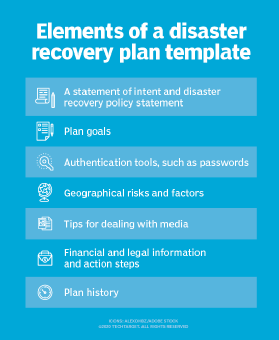
Other important elements of a disaster recovery plan template include the following:
- a statement of intent and a DR policy statement;
- plan goals;
- authentication tools, such as passwords;
- geographical risks and factors;
- tips for dealing with media;
- financial and legal information and action steps; and
- a plan history.
Testing your disaster recovery plan
DRPs are substantiated through testing to identify deficiencies and provide opportunities to fix problems before a disaster occurs. Testing can offer proof that the emergency response plan is effective and hits RPOs and RTOs. Since IT systems and technologies are constantly changing, DR testing also helps ensure a disaster recovery plan is up to date.
Reasons given for not testing DRPs include budget restrictions, resource constraints and a lack of management approval. DR testing takes time, resources and planning. It can also be risky if the test involves using live data.
Build and execute your own disaster recover tests using SearchDisasterRecovery's free, downloadable business continuity testing template.
DR testing varies in complexity. In a plan review, a detailed discussion of the DRP looks for missing elements and inconsistencies. In a tabletop test, participants walk through plan activities step by step to demonstrate whether DR team members know their duties in an emergency. A simulation test uses resources such as recovery sites and backup systems in what is essentially a full-scale test without an actual failover.
Incident management plan vs. disaster recovery plan
An incident management plan (IMP) -- or incident response plan -- should also be incorporated into the DRP; together, the two create a comprehensive data protection strategy. The goal of both plans is to minimize the impact of an unexpected incident, recover from it and return the organization to its normal production levels as fast as possible. However, IMPs and DRPs are not the same.
The major difference between an incident management plan and a disaster recovery plan is their primary objectives. An IMP focuses on protecting sensitive data during an event and defines the scope of actions to be taken during the incident, including the specific roles and responsibilities of the incident response team.
In contrast, a DRP focuses on defining the recovery objectives and the steps that must be taken to bring the organization back to an operational state after an incident occurs.
Learn what it takes to develop a disaster recovery plan that considers the cloud and cloud services.